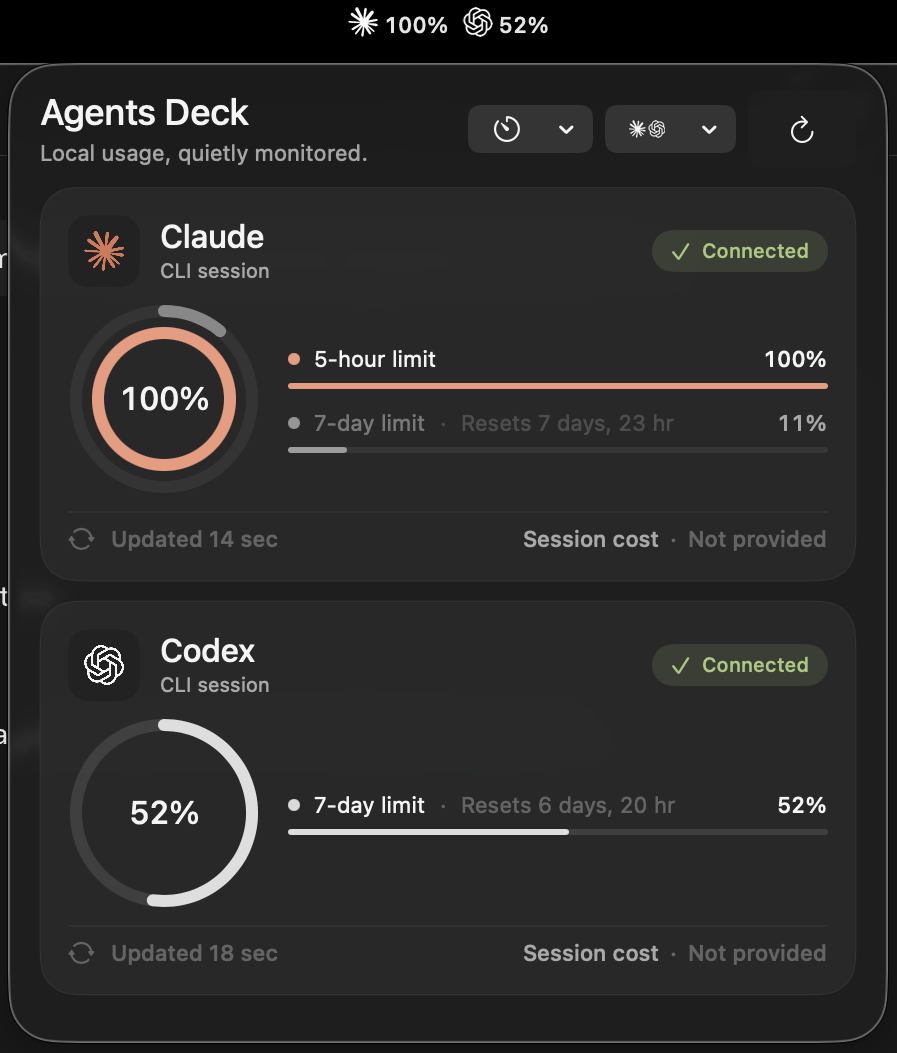
Agents Deck
Agents Deck is a small, local-only macOS menu bar app for monitoring verified Claude Code and Codex subscription usage.
It shows each provider's verified usage windows with their real durations, reset times, provider-supplied session cost or Codex credit information, and freshness. There is no Agents Deck account, backend, telemetry, cloud sync, or App Store dependency.
Agents Deck is an independent open-source project. It is not affiliated with Anthropic or OpenAI.
Download and install
- Download
Agents-Deck-1.2.2.dmgand its.sha256file from the latest GitHub Release. - Optionally verify the download:
   shasum -a 256 -c Agents-Deck-1.2.2.sha256
gh attestation verify Agents-Deck-1.2.2.dmg --repo vulonviing/agents-deck- Open the DMG and drag Agents Deck to Applications.
- Try to open Agents Deck once. This free build is ad-hoc signed and is not Apple-notarized, so macOS will block the first launch.
- Open System Settings → Privacy & Security, scroll to Security, click Open Anyway, then confirm Open.
Do not disable Gatekeeper globally. The override applies only to the exact app build you approved. Apple explains this flow in Open apps safely on your Mac.
Manual updates
Agents Deck does not contact GitHub or run an automatic updater. To update:
- Quit Agents Deck from the menu bar icon's right-click menu.
- Download and verify the new DMG from GitHub Releases.
- Drag the new Agents Deck into Applications and choose Replace.
- Use Open Anyway again if macOS requests it for the new download.
The bundle identifier remains stable, and application data under ~/Library/Application Support/Agents Deck/ is not stored inside the app bundle, so replacing the app preserves verified history and diagnostics.
Requirements
- macOS 26 or later
- At least one of:
- Claude Code
- OpenAI Codex CLI
- An individual Claude or ChatGPT/Codex subscription with usage data available to its official CLI
Build from source
Building requires a full Xcode installation that supports macOS 26 and Swift 6. Command Line Tools alone are not enough.
- Clone the repository.
- Open
AgentsDeck.xcodeprojin Xcode. - Select the shared
AgentsDeckscheme and theMy Macdestination. - Press Run.
- Complete the local setup guide. You can configure Claude, Codex, or both.
The command-line build check is:
xcodebuild -project AgentsDeck.xcodeproj -scheme AgentsDeck -destination 'platform=macOS' buildHow usage data is obtained
Agents Deck has no backend, user account, analytics endpoint, or telemetry collector. It launches the provider-installed command-line tools locally and normalizes only verified usage fields. Those CLIs may communicate with their own official provider services as they normally do; Agents Deck itself does not proxy that traffic through an Agents Deck server.
Claude
Agents Deck checks login state with claude auth status --json. If login is required, the setup guide copies this official command and opens Terminal:
claude auth login --claudeaiAgents Deck refreshes Claude's built-in /usage command at startup, on popover/manual refresh, and on a user-selected randomized cadence. The available ranges are 1–3, 3–5, and 4–6 minutes; each provider receives an independent delay and the default is 1–3 minutes. This is a local slash command, not a model prompt, so the app does not send synthetic messages to consume usage. The command runs with tools and customizations disabled; its bounded rendered output is normalized in memory and never logged or stored raw.
Claude also exposes subscription limits through its documented status-line JSON. With explicit permission, the optional bridge adds immediate post-response updates and session cost. Agents Deck:
- backs up
~/.claude/settings.json; - merges a small bridge command without replacing unrelated settings;
- continues invoking an existing status-line command;
- extracts only
rate_limitsandcost.total_cost_usd; - writes a private, sanitized local snapshot;
- restores the previous setting only when doing so cannot overwrite a later user change.
If the bridge has not produced data yet, the /usage probe can still provide verified windows. Session cost remains unavailable until Claude reports it through the status line.
The Claude detail page also reads Claude Code's own local stats-cache.json in read-only mode. It shows an explicitly Local and approximate Overview/Models view with all-time, seven-day, and thirty-day aggregates. Only daily counts, aggregate input/output model tokens, streak inputs, peak hour, and longest-session duration are allowlisted. Raw JSON, cost and cache-token fields, session identifiers, and unknown fields are discarded.
Agents Deck does not identify which model, effort, or thinking configuration produced a particular Claude session. It never reads conversation transcripts, and it never requests an organization Admin API key.
Codex
Agents Deck starts one codex app-server child process and uses its documented JSONL protocol. It checks the current account, opens the official ChatGPT login URL when requested, consumes rate-limit update notifications, and uses the same independently randomized fallback cadence selected for Claude.
The Codex detail page reads the app-server account/usage/read summary and daily buckets, then renders Daily, Weekly, and Cumulative views. Hovering a day or weekly bar shows its exact period and token count. Only the latest normalized account snapshot is cached locally; raw JSON is discarded.
The same detail page shows the available reset-credit count and nearest provider-supplied expiry from account/rateLimits/read. The client uses a closed allowlist containing initialize, account/read, account/rateLimits/read, account/usage/read, and the explicit login flow. It deliberately cannot represent or send account/rateLimitResetCredit/consume, so Agents Deck never redeems a reset credit. It does not use thread-list/read calls to infer model activity and never reads conversation contents, Codex auth files, or tokens.
Codex window durations are supplied by app-server and may differ by account. Agents Deck labels the actual duration and uses the shortest verified window for the card gauge. If Codex supplies only a seven-day window, the card still shows it; the menu-bar percentage remains unavailable unless a verified window shorter than seven days exists. Billing is shown only when app-server supplies an individual monthly limit or credit balance. Otherwise the card says Cost · Not provided rather than estimating money from tokens.
Menu bar interaction
- Left-click the menu bar item to open a resizable usage panel. Drag a panel edge or corner to resize it; the last size is restored on the next open.
- Click a usage ring or its metric row to select that window. The center defaults to the lowest verified percentage whenever the panel opens.
- Use the provider menu beside Refresh to show Claude, Codex, or both in the menu bar. Each segment follows that provider card's selected usage window.
- Click a provider card's logo or name to open its detail page. Both providers show connection diagnostics. Codex additionally shows verified token activity and read-only reset-credit availability. Claude shows separately labelled local aggregate activity and aggregate model totals; it never attributes a model or reasoning effort to a session. Agents Deck never inspects threads or conversation contents.
- Use the timer menu to choose a 1–3, 3–5, or 4–6 minute automatic refresh range. Display mode, cadence, selected windows, and panel size are restored after relaunch.
- Hover the center percentage to see the selected window's name.
- Hover any interactive control to see subtle motion and an action-oriented tooltip. Reduce Motion disables the transform without removing the tooltip or focus indication.
- Right-click the menu bar item for Settings… and Quit Agents Deck.
Privacy
Agents Deck stores only normalized provider usage, notification receipts, preferences, and redacted technical events. It never stores prompts, responses, source code, diffs, repository paths, transcript paths, provider session IDs, credentials, or raw provider payloads.
Application-owned data stays under:
~/Library/Application Support/Agents Deck/- Verified usage history is retained for 365 days.
- History is stored in
History/History.store. A recognized legacydefault.storeis copied, validated, promoted, and then archived underBackups/; an unrelated or malformed legacy file is left untouched. - Redacted JSONL diagnostics are retained for 14 days and capped at 50 MB.
- History and logs can be cleared separately from Settings.
- Provider credentials remain in provider-managed storage.
- Network access is limited to behavior performed by the official provider CLIs; Agents Deck has no server of its own.
- The app does not contact GitHub for update checks. GitHub is used only when a person visits the repository or downloads a release.
Distribution security
Release DMGs are built on an ephemeral GitHub-hosted macOS 26 runner using only Apple command-line tools. Each release includes a SHA-256 checksum and a GitHub artifact attestation. The workflow rejects local user paths, credential markers, internal development material, unexpected bundle contents, non-system dynamic libraries, and unexpected code-signing entitlements before publishing.
Version 1.2.2, like every release since, is ad-hoc signed because the project has no paid Apple Developer membership. Version 1.0.0 was withdrawn and replaced by 1.0.1 after release-build hardening. A checksum and attestation help verify the published artifact, but they are not substitutes for Developer ID signing and Apple notarization. The release page and this README intentionally disclose that limitation.
Runtime design
- One SwiftUI menu bar application; no Dock icon.
- One cancellable coordinator scheduler with independently jittered Claude and Codex rate-limit deadlines, a 15-minute Codex token-activity fallback, Claude local-stats freshness evaluation, and maintenance.
- One event-driven Claude bridge-directory observer.
- One Codex app-server process, terminated when Agents Deck quits.
- No helper daemon, launch agent, telemetry service, or permanently running tests.
- Launch at Login is optional and off by default.
The provider marks bundled in the UI are sourced from the official Anthropic press kit and OpenAI brand guidelines. Their inclusion does not imply affiliation or endorsement.
Troubleshooting
Xcode says Command Line Tools are active
Install full Xcode, open it once to finish setup, then select it in Xcode → Settings → Locations → Command Line Tools. The usual terminal equivalent is:
sudo xcode-select --switch /Applications/Xcode.app/Contents/DeveloperA CLI is not found
GUI apps do not always inherit your shell PATH. Open Agents Deck Settings and choose the exact claude or codex executable.
Claude says Waiting for data
Use Refresh and confirm claude /usage works in Terminal. Installing the optional bridge adds immediate post-response updates and session cost. Automatic refresh never runs faster than the selected range's one-minute minimum.
Codex retry is paused
Agents Deck stops automatic restarts after five failures in ten minutes. Confirm the CLI works, then use Retry or reconnect it from Settings.
Where are diagnostics?
Use Settings → Diagnostics → Reveal Logs. Logs contain event categories and error codes, not raw CLI output.